Clipping guide
Best GTA clipping apps in 2026
The best GTA clipping apps and tools in 2026 for finding paid campaigns, capturing PS5 and PC gameplay, editing vertical clips and tracking views.
GTA is one of the biggest categories in short-form gaming content, and with GTA VI out on PS5 and Xbox Series X|S from November 19, 2026, demand for clips is only going up. Whether you clip your own gameplay or get paid to clip other creators' streams, the right apps save you hours and help your clips actually get approved and paid.
Here are the tools worth using in 2026, grouped by what they're best at. Full disclosure: Never Wasted is our app. We've kept the rest of the list honest.
What to look for in a GTA clipping app
- Where the footage comes from. Twitch, Kick and YouTube VODs, PS5 or Xbox captures, or PC recordings.
- Vertical editing. 9:16 crops, facecam layouts, captions that read on mute and fast trimming.
- Campaign fit. If you're clipping for money, you need to follow each campaign's rules on CTAs, hashtags, original content and audience.
- Tracking. Paid campaigns pay on views, so you need to know which clips are performing.
The best GTA clipping apps and tools
1. Never Wasted: best for paid GTA clipping campaigns
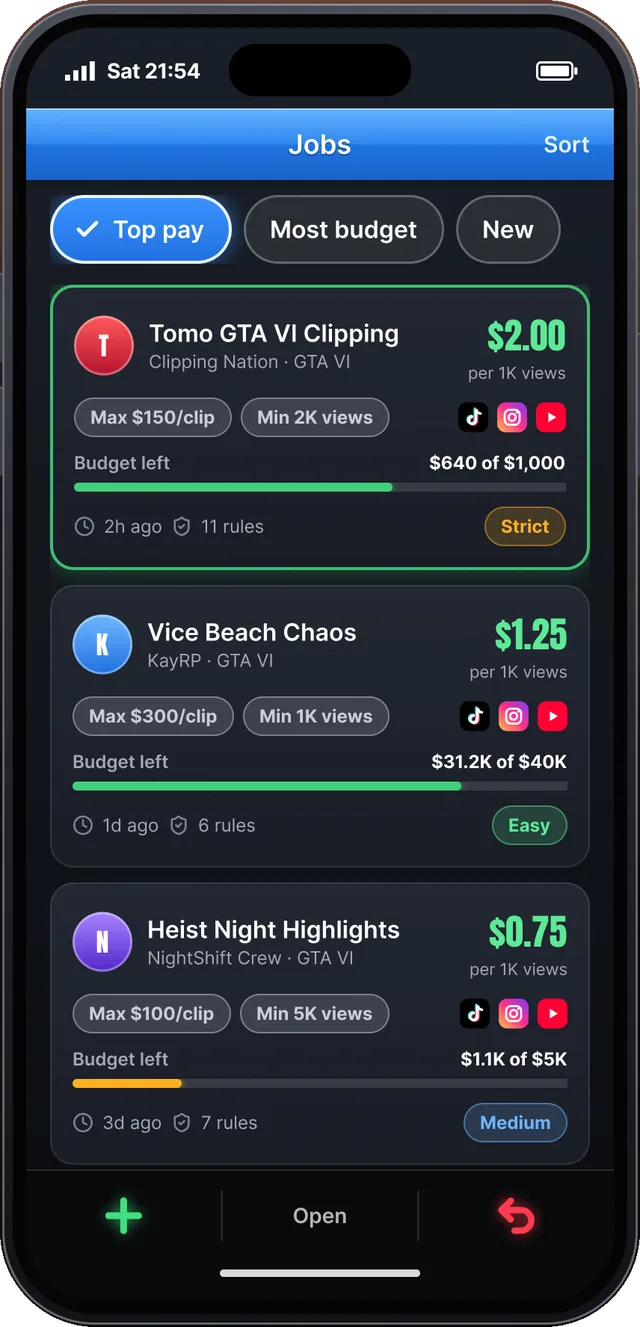
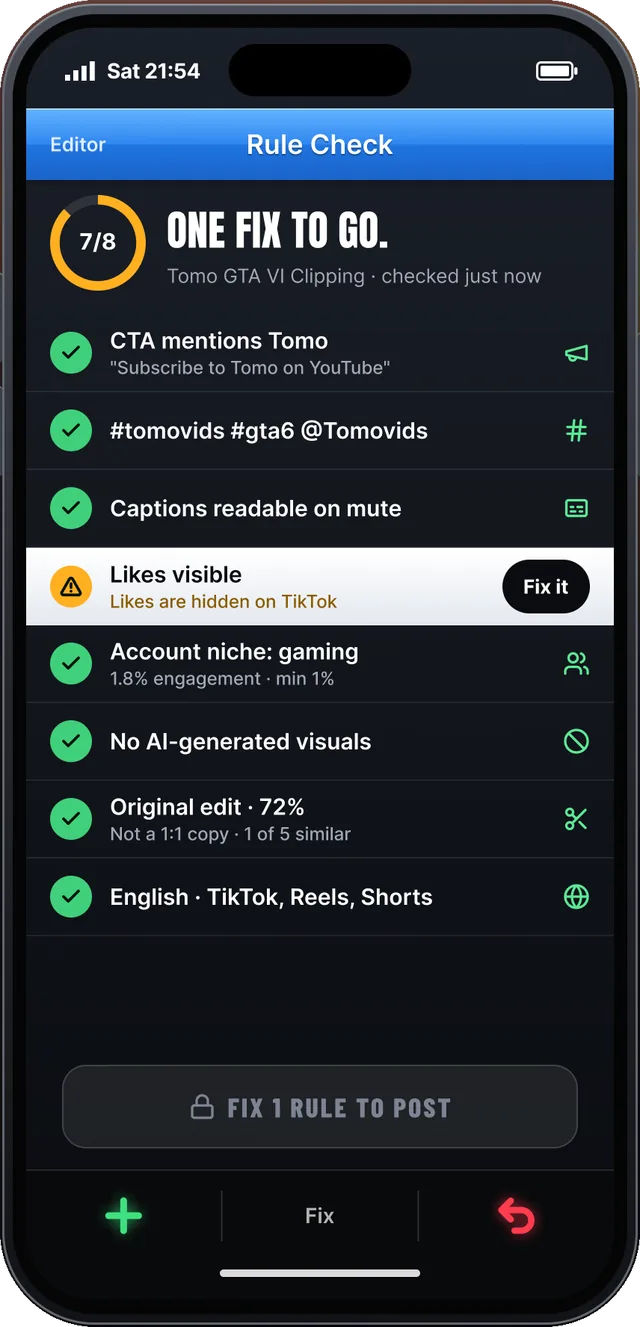
Never Wasted is a GTA clipping app for iPhone built around paid campaigns. A Jobs board lists live GTA clipping campaigns with pay per 1K views and budget left. You pick a creator's VOD or your own PS5 stream, Marlo (the in-app planner) flags the best moments, and you make the cut with your own hook, captions and voice-over. A rule check adds the campaign's CTA, hashtags and @handle and flags problems like hidden likes before you post. Then it tracks views and earnings per clip.
Best for: clippers who want to earn from GTA V and GTA VI campaigns. Status: coming soon, join the waitlist.
2. Content Rewards: best place to browse live campaigns
Content Rewards is a public marketplace where creators and brands post clipping campaigns that pay per view. Gaming and GTA campaigns show up regularly, with listings commonly paying around $0.25 to $2 per 1,000 views. You still need your own tools to capture, edit and post.
3. PS5 built-in capture and the PlayStation App: best free capture on console
The PS5's Create button lets you save recent gameplay or start a new recording, and captures can auto-upload to the PlayStation App so you can grab them on your phone. It's the fastest free way to clip your own GTA gameplay on console. Read our full guide on how to clip GTA from PS5.
4. Medal: best for PC players
Medal runs in the background on PC and saves the last moments of gameplay with a hotkey, so you never miss a crash or a clutch escape. Good for GTA V on PC and for building a library of raw moments.
5. Twitch Clips: best for grabbing moments from live streams
Twitch's built-in clip tool lets anyone cut a short clip from a live stream or VOD in a couple of taps. It's landscape-only, so you'll need an editor to make it vertical, but it's a quick way to mark moments while watching.
6. CapCut: best general-purpose mobile editor
CapCut is the go-to free editor for short-form video, with auto-captions, templates and easy 9:16 layouts. It doesn't know anything about campaign rules, so you'll need to check those yourself.
7. Opus Clip and other AI clippers: best for volume, with a warning
AI clipping tools can turn a long VOD into dozens of auto-cut clips fast. That's great for your own channel, but many paid GTA campaigns ban AI-generated content and straight re-uploads. If you use an AI clipper for paid work, treat its output as a starting point and make your own edit. See GTA clipping rules.
Comparison table
| Tool | Best for | Finds campaigns | Rule check | Platform |
|---|---|---|---|---|
| Never Wasted | Paid GTA clipping | Yes | Yes | iPhone (coming soon) |
| Content Rewards | Browsing campaigns | Yes | No | Web |
| PS5 capture + PS App | Console capture | No | No | PS5, phone |
| Medal | PC capture | No | No | PC |
| Twitch Clips | Marking stream moments | No | No | Web, mobile |
| CapCut | Editing | No | No | Mobile, desktop |
| AI clippers | Volume for own channel | No | No | Web |
Recommended stack for 2026
- Clipping your own PS5 gameplay: PS5 capture → PlayStation App → your editor → post.
- Clipping for paid campaigns: find the job → pull the creator's VOD → make an original cut → check the rules → post and track. That's the full loop Never Wasted is built to handle in one app.
Next up: our GTA 6 clipping guide and how to make money clipping.
FAQ
What is the best app for clipping GTA?
It depends on the job. For finding paid GTA clipping campaigns and cutting rule-ready clips on your phone, Never Wasted is built for exactly that (coming soon to iPhone). For capture, use your PS5's built-in tools or Medal on PC. For general editing, CapCut is the common pick.
Can I use an AI clipping tool for paid campaigns?
Check the campaign rules first. Many GTA campaigns ban AI-generated content and straight re-uploads, so fully automatic AI clips can get rejected. Use AI to find moments, then make your own cut, hook and voice-over.
Do I need a PC to clip GTA?
No. You can capture on PS5 or Xbox, move the footage to your phone, and edit and post entirely from mobile.